World comparison
When you lock a placement, it starts comparing itself with the world. Blocks you have built correctly disappear from the ghost, mistakes get coloured boxes, and the overlay counts your progress.
Following and anchored placements don’t compare. They always show their whole ghost with no boxes.
What you see
Section titled “What you see”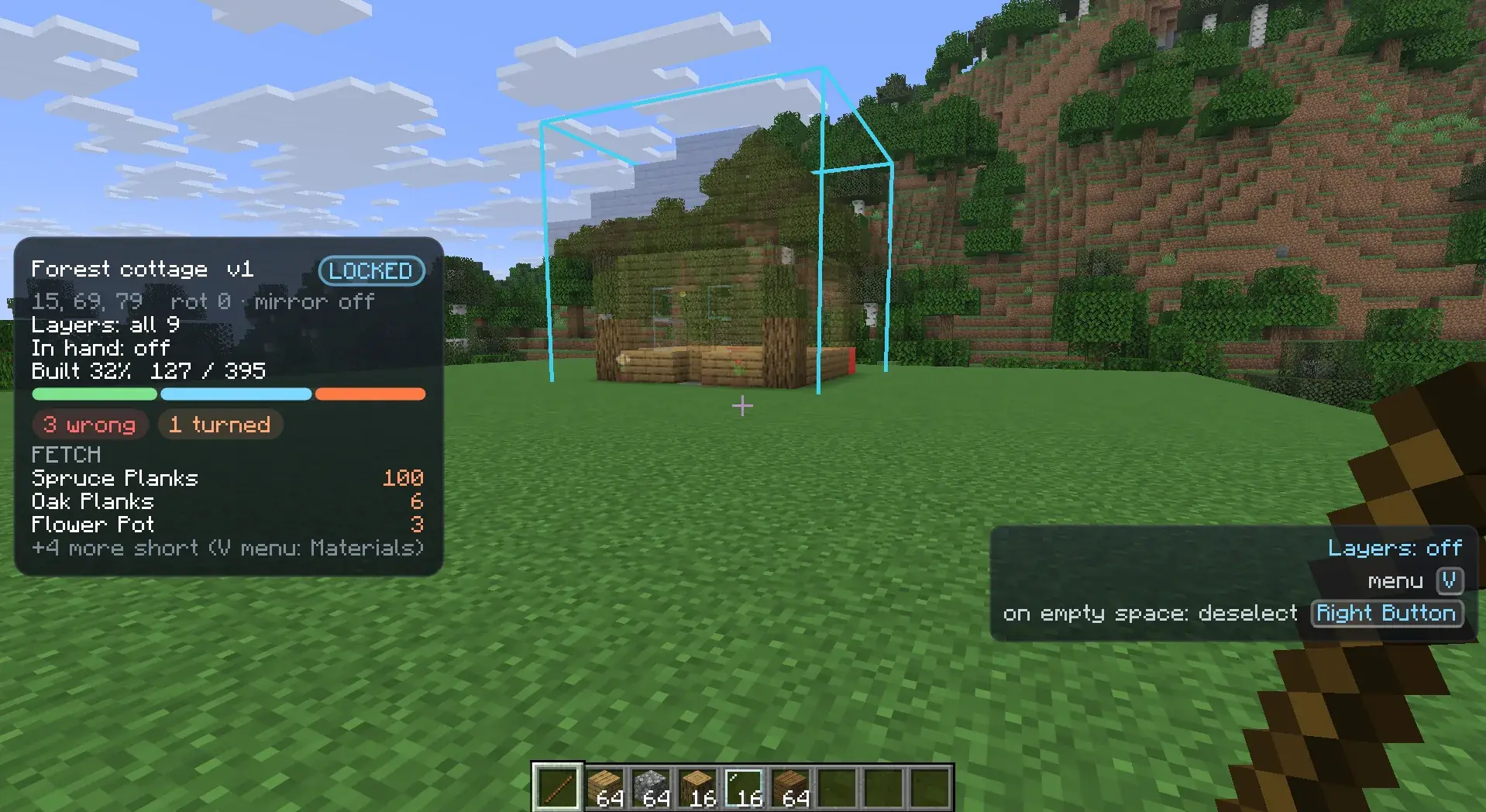
Every position of a locked placement is in one state:
| State | What you see |
|---|---|
| Matching | Nothing. The block is right. |
| Missing | The normal ghost. Place the block here. |
| Wrong block | A red box. A different block is there. |
| Wrong orientation | An orange box. The right block, but turned the wrong way. |
| Too many | An orange box. More candles, sea pickles or snow layers than planned, or a double slab where a single slab belongs. |
| Not enough yet | The ghost with an orange box. For example 1 of 3 candles, a single slab where a double slab belongs, or a flower pot without its plant. |
| Wrong water | A cyan box. The block should be waterlogged and isn’t, or the other way round. |
| Needs finishing | A yellow box. Use a tool or water on it, for example a shovel to turn dirt into a dirt path. |
| Extra | A magenta box. A block stands where the plan has air, for example tall grass inside the footprint. |
| Not compared yet | The normal ghost, until the comparison has reached it or its chunk is loaded. |
Boxes follow the shape of the block that is there, so leaf litter gets a flat box and stairs get two. A box only shows where you can see the block directly, never through a wall. Ghosts don’t hide boxes, so you can see a wrong block through the ghosts in front of it.
What counts as orientation
Section titled “What counts as orientation”Orientation is which way a block faces, its axis, its rotation, top or bottom half, a door’s hinge, what a button or lever is attached to, whether a slab is top or bottom, whether a chest is single or which half of a double chest, and whether a door, trapdoor or fence gate is open.
Other differences don’t count as mistakes: fence and wall connections, redstone power, whether something is lit, a crop’s age, stair shapes, or a barrel standing open.
Blocks the plan accepts
Section titled “Blocks the plan accepts”Some blocks count as right even though they are not exactly the planned block. For example dirt is accepted where the plan has a grass block. Where the planned block needs a finishing step, such as a dirt path on dirt or a stripped log on a log, the position shows yellow until you finish it.
Positions that are not compared
Section titled “Positions that are not compared”- Structure voids in the schematic are ignored.
- Blocks your game doesn’t know, for example from a mod you don’t have, can’t be checked. They show the missing-texture placeholder (unless you hid unknown blocks) and no box, and they don’t count towards progress.
- Positions in chunks that are not loaded are not compared until the chunk loads.
When there are several problems
Section titled “When there are several problems”When a block is wrong in several ways, you see the first one to fix, in this order: wrong block, wrong orientation, too many, not enough yet, wrong water, needs finishing. For example dry stairs facing the wrong way show as wrong orientation first.
How fast it updates
Section titled “How fast it updates”When you place or break a block inside a locked placement, the positions around it update within a second.
Changes you didn’t make, for example by another player, are found by a check that runs in the background, closest to
you first. Near you they show within a few seconds. [comparison] cellsPerTick sets how many
positions it checks per tick (20,000 by default). Higher values notice changes sooner but cost more time per tick.
Layers and the comparison
Section titled “Layers and the comparison”Ghosts and boxes only show in the layers that are visible. In follow feet, you still see the mistakes below you. In from-to, mistakes outside the range are hidden.
The in-hand filter only hides ghosts. Mistake boxes show whatever you hold.
Progress in the overlay
Section titled “Progress in the overlay”While you hold the remote (or pin the overlay), the overlay shows for the selected locked placement:
- Progress:
Built 62% 3104 / 5006, the matching blocks out of all blocks to build. Air, structure voids and blocks your game can’t check don’t count. Extra blocks don’t lower the progress. Not enough yet, and positions not compared yet, count as not done. - Layer progress:
These layers 88% 440 / 500, the same for the visible layers only, when a layer mode is on. Scanning...right after locking, until every loaded position has been compared once.- Mistake counts for the whole placement, in their colours:
12 wrong(red),4 turned(orange),2 too many(orange),2 water(cyan),3 extra(magenta). A count of 0 is left out. - Finishing, in yellow, for the visible layers: for example
3 blocks need a shovelor2 blocks need an axe. - A progress bar: built in green, carried in your inventory in blue, short in orange. See Materials.
The overlay doesn’t describe the block under your crosshair. The targeting HUD under the crosshair does that; see Placing and moving.
Mistake pointer
Section titled “Mistake pointer”On a large build, finding the last few mistakes can take a while. The mistake pointer shows the way to the nearest one.
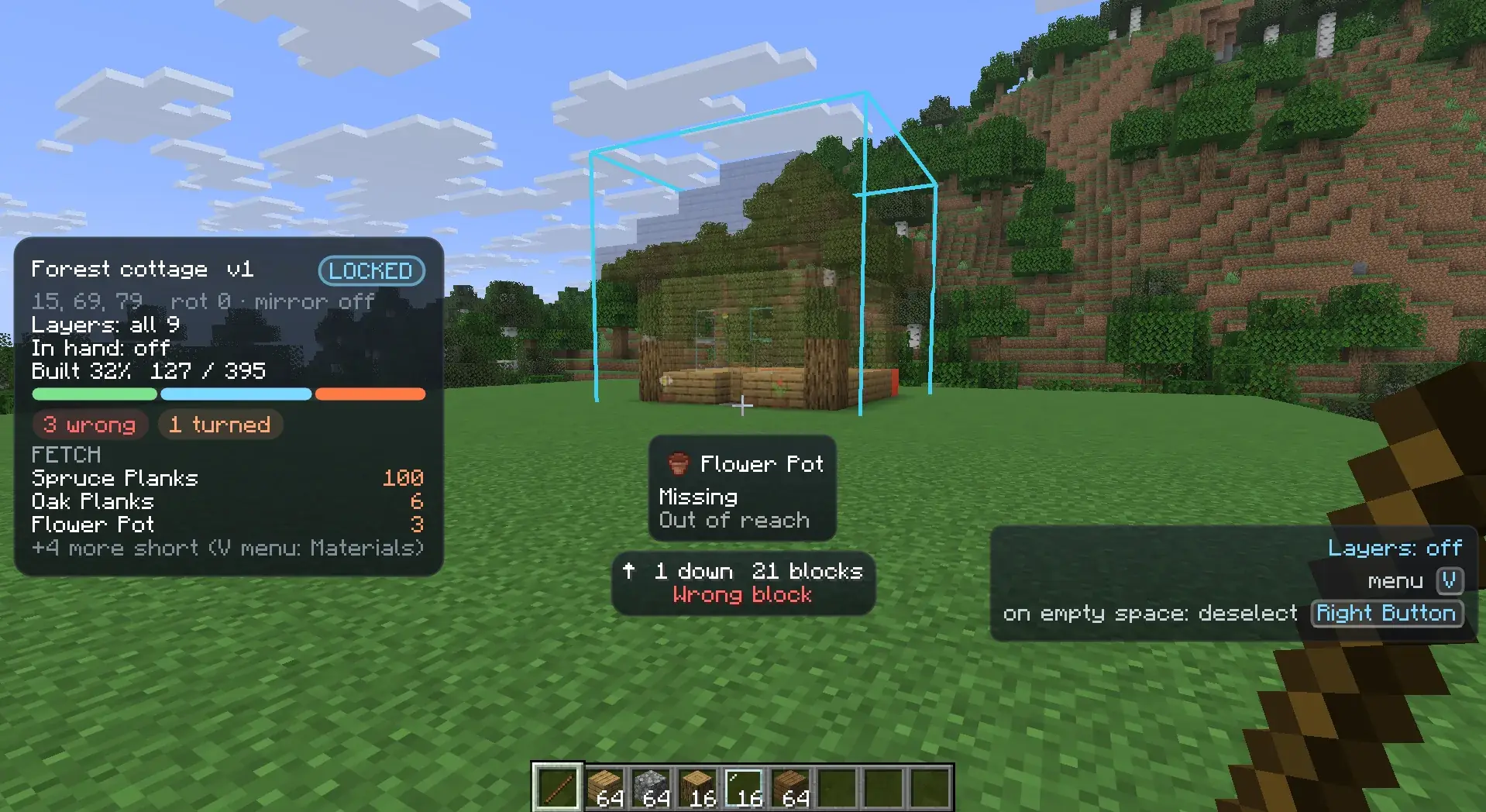
Turn it on from the wheel: pick Options, then Mistakes, then one of:
| Choice | Points at |
|---|---|
| Off | Nothing. This is the default. |
| Mistakes | The nearest boxed position: wrong block, wrong orientation, too many, not enough yet, wrong water, extra or needs finishing. |
| Mistakes and missing | The same, plus blocks that are still missing. Handy for the last few blocks of a build. |
The setting is saved as [targeting] mistakePointer (OFF, MISTAKES or MISTAKES_AND_MISSING)
and applies to every placement.
While it is on and a locked placement is selected, a small pointer under the crosshair shows:
- an arrow towards the position, relative to where you look (pointing down the screen means behind you)
- how far up or down it is, such as
3 up - the distance, such as
12 blocks - its state in the comparison colours, such as
Wrong blockin red
It only looks at the selected placement and its visible layers. It picks the nearest position as you move and updates
within a second after you fix one. When nothing is left it says No mistakes, or No mistakes and nothing missing.
Finishing a placement
Section titled “Finishing a placement”When every counted block of a locked placement matches, it finishes:
- a short success sound plays
- a toast says
<name> finishedand how to bring it back - the placement is removed, and nothing is selected afterwards if it was selected
Extra blocks don’t stop a placement from finishing, but a part in an unloaded chunk does. If the placement has blocks your game can’t check, the toast says how many were not checked.
If you lock a placement over a build that already matches, it finishes as soon as everything has been compared.
Bringing it back
Section titled “Bringing it back”For 10 seconds after it finishes, you can get the placement back: open the wheel with V and pick Bring back, the first segment. With nothing selected you need the remote in your hand to open the wheel. The placement comes back locked and selected, at the same spot, with its layers, in-hand filter and swaps. Only the placement that finished last can be brought back.
A brought-back placement doesn’t finish again at once. It finishes again after you break and replace a block, so its progress drops below 100% and comes back.