Settings
Heavymatica keeps its settings in config/heavymatica-client.toml in your game folder. It is the same file with the
same settings on Fabric and NeoForge, so you can copy it from one to the other.
The settings screen
Section titled “The settings screen”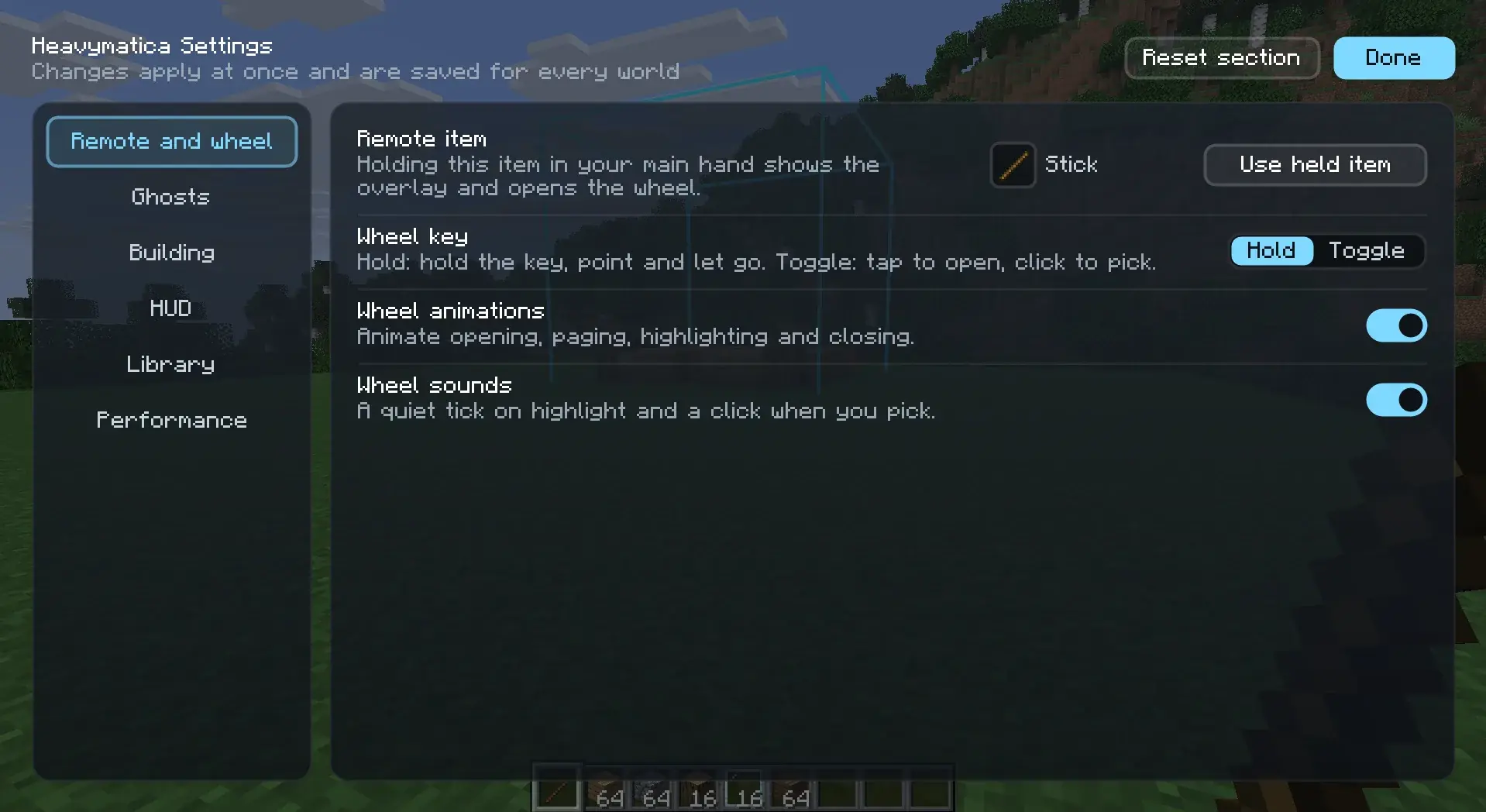
The easiest way to change settings is the settings screen in the game. Open it from the gear button at the top of the library (H), or from the mods list:
With Mod Menu installed, open the Mods screen, select Heavymatica and click its config button. Without Mod Menu, use the gear button in the library.
Open the Mods screen, select Heavymatica and click Config.
Done takes you back to where you came from.
The settings are grouped into the sections Remote and wheel, Ghosts, Building, HUD, Library and Performance. Each setting has a short explanation. Reset section puts the section you are looking at back to its defaults and leaves the others alone.
A change takes effect at once, even while the screen is still open, and is saved to the file. A value outside the allowed range is not accepted.
A few settings are easier on the screen than in the file:
- Remote item: hold the item you want and click Use held item. It needs an item in your main hand and an open world.
- Opacity steps for the wheel: add and remove steps in a list. You can have 2 to 8 steps from 5% to 100%.
- Heavymatica Cloud: Automatic, Always or Never. See Library for what each does.
The cloud address and the settings meant for development are only in the file.
Editing the file
Section titled “Editing the file”You can also open config/heavymatica-client.toml in a text editor. If a value is missing or not valid, Heavymatica
uses its default instead.
Fabric reads the file when the game starts. Changes you make to the file while the game runs take effect at the next start. Use the settings screen to change things while you play.
NeoForge notices when you save the file while the game runs and uses the new values.
All settings
Section titled “All settings”Each table below is one section of the file, with every setting, what it does and its default.
[cloud]
Address of the Heavymatica Cloud.
| Setting | What it does | Default |
|---|---|---|
cloudUrl | "https://api.heavymatica.com" | |
devSessionJoinUrl | Development only: sign in through the cloud's DevMojang at this address instead of Mojang, for example http://localhost:5180/dev/mojang. Leave empty to sign in with your Minecraft account. | "" |
access | Heavymatica Cloud: AUTO asks the cloud whether it is open when you open the library, ON always shows it, OFF never contacts it. Values: AUTO, ON, OFF. | "AUTO" |
[cache]
Size of the local cache of downloaded schematics and thumbnails, in MiB.
| Setting | What it does | Default |
|---|---|---|
cacheSizeMiB | Range: 64 to 65536. | 1024 |
[remote]
The item that works as the placement remote while held in the main hand, for example minecraft:blaze_rod. Items in the item tag heavymatica:remotes always work too.
| Setting | What it does | Default |
|---|---|---|
item | "minecraft:stick" |
[ghost]
Opacity of placement ghosts, from 0.05 (barely visible) to 1 (solid).
| Setting | What it does | Default |
|---|---|---|
opacity | Range: 0.05 to 1.0. | 0.4 |
opacitySteps | Opacities offered on the placement wheel, 2 to 8 values from 0.05 to 1. Values out of range and duplicates are dropped; with fewer than 2 or more than 8 left, the default steps are used. | [0.2, 0.4, 0.6, 0.8, 1.0] |
showUnknownBlocks | Show blocks the game does not know (from mods that are not installed or newer versions) as missing-texture cubes. | true |
blockBudget | Visible ghost blocks drawn at most, across all placements. Placements beyond it show as outlines only. Range: 1000 to 10000000. | 300000 |
[overlay]
Screen side of the placement overlay shown while the remote is held.
| Setting | What it does | Default |
|---|---|---|
side | Values: LEFT, RIGHT. | "LEFT" |
compact | Replaced by keyHints. When true at start, key hints are turned off and this goes back to false. | false |
keyHints | Show the key hints in the bottom-right corner while the remote is held. | true |
pinned | Keep the placement overlay on screen without the remote while a placement is selected. | false |
[wheel]
How the placement wheel works. HOLD: hold the wheel key, point and let go. TOGGLE: tap the key to open, click to pick.
| Setting | What it does | Default |
|---|---|---|
mode | Values: HOLD, TOGGLE. | "HOLD" |
animations | Animate the placement wheel as it opens, changes page, highlights and closes. Off shows each state at once. | true |
sounds | Play a quiet tick when the wheel highlights another segment, and a click when a segment is picked. | true |
[layers]
| Setting | What it does | Default |
|---|---|---|
hotbarOpacity | With the in-hand filter, the opacity of blocks matching other hotbar items, as a share of the ghost opacity. Range: 0.05 to 1.0. | 0.33 |
[comparison]
| Setting | What it does | Default |
|---|---|---|
cellsPerTick | Positions of locked placements compared with the world per tick, besides those within reach of the player. Higher values notice other players' changes sooner and cost more time per tick. Range: 1000 to 1000000. | 20000 |
[targeting]
| Setting | What it does | Default |
|---|---|---|
hudRange | How far away, in blocks, the ghost under the crosshair is named in a small HUD below the crosshair. 0 turns the HUD off. Range: 0 to 128. | 32 |
pickBlock | Pick block (middle click) on a ghost within reach picks the item for the planned block from the inventory. Sneak while picking, or turn this off, to pick the block behind the ghost as usual. | true |
mistakePointer | Mistake pointer: an arrow below the crosshair toward the nearest position of the selected locked placement that needs attention. OFF, MISTAKES (boxed positions only) or MISTAKES_AND_MISSING (also positions still missing their block). Values: OFF, MISTAKES, MISTAKES_AND_MISSING. | "OFF" |
[build]
| Setting | What it does | Default |
|---|---|---|
easyPlace | Easy Place: right-clicking a ghost within reach with its item places the planned block with the planned orientation. | false |
placementRestriction | Placement restriction: refuse block placements that would put a wrong block into a locked placement's visible layers. | false |